This article will show you how to use aixios’s All-in-One Dashboard for Email Marketing. This powerful dashboard gives you a unified view of all email activity — including emails sent through Campaigns, Workflows, and Bulk Actions — making it easier to monitor performance and make data-driven decision.
TABLE OF CONTENTS
What is the All-in-One Dashboard for Email Marketing?
Key Benefits of the All-in-One Dashboard
How To Use the All-in-One Dashboard
Feature Highlight: Top Performing Emails
Frequently Asked Questions
Next Steps
What is the All-in-One Dashboard for Email Marketing? #
The All-in-One Dashboard is a centralized hub in aixios where you can view performance metrics for every email sent through Campaigns, Workflows, and Bulk Actions. Rather than switching between tools, you now have a consolidated view that streamlines email performance tracking and planning.
Key Benefits of the All-in-One Dashboard #
A centralized dashboard simplifies monitoring and planning by combining all email metrics into one place.
- See performance for Campaign, Workflow, and Bulk Action emails in one view
- Gain insights from Top Performing Emails by type
- Use filters to isolate data by channel
- Scroll to explore detailed stats including open/click rates
- Improve decision-making with all relevant data at your fingertips
How To Use the All-in-One Dashboard #
Learn how to navigate and interact with the dashboard to monitor your email marketing efforts effectively.
- Go to Marketing > Emails > Statistics
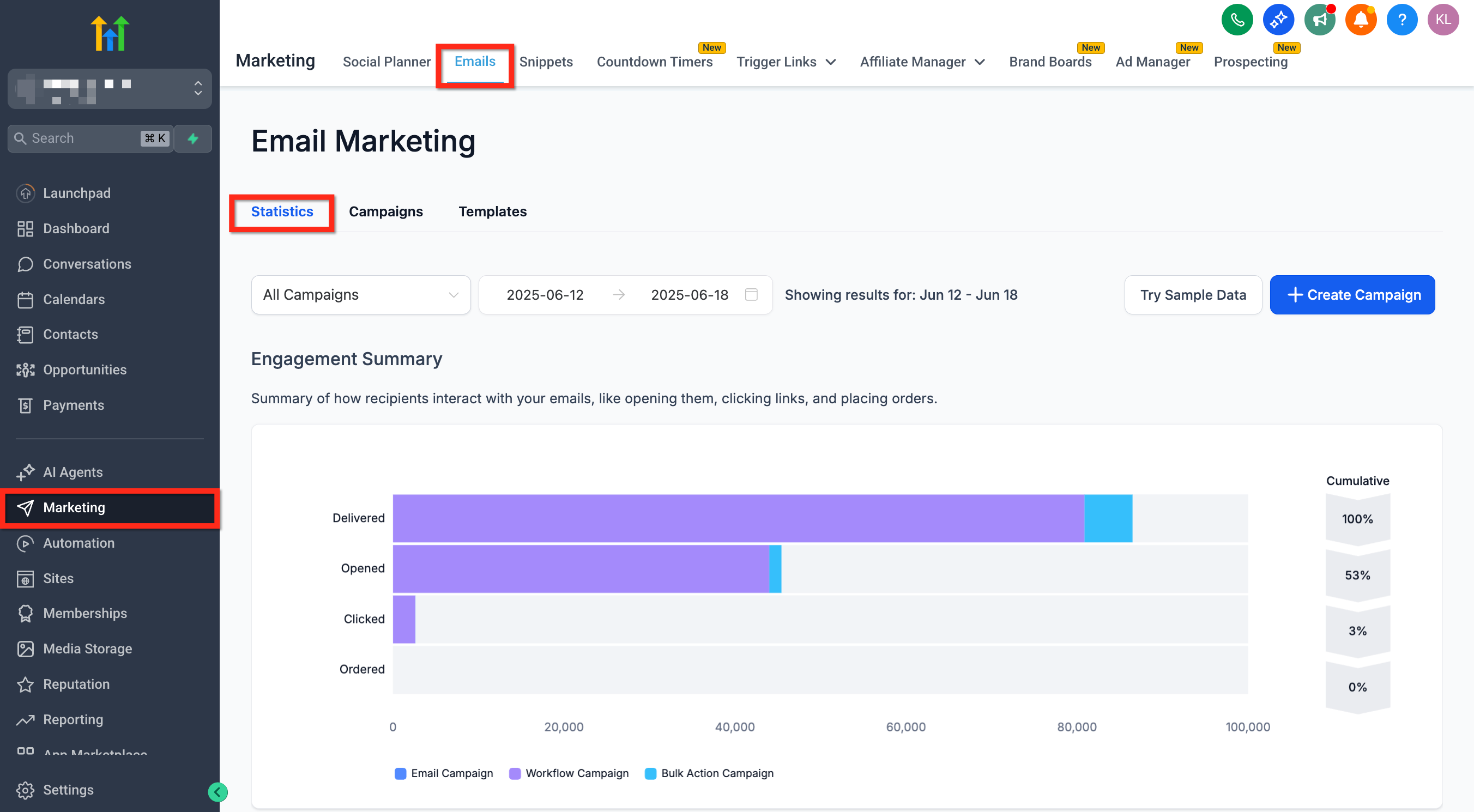
- View the unified stats displayed by default
- Use the dropdown in the top-left to filter by email channel
- Scroll down to explore deeper performance metrics including Top Performing Emails
Feature Highlight: Top Performing Emails #
This section helps identify which email content drives the most engagement, broken down by type.
Top Performing Emails displays the most effective individual emails:
- For Campaigns and Bulk Actions: tracks entire email sends
- For Workflows: highlights performance at the individual email action level, not the full workflow
Frequently Asked Questions #
Q: Can I export data from the dashboard?
Currently, export functionality is not available directly from the dashboard.
Q: Does the dashboard include SMS or other messaging stats?
No, the dashboard currently focuses on email activity only.
Q: Can I compare performance across different email types?
Yes, use the dropdown to filter by channel, and visually compare performance metrics.
Q: Are automated emails from triggers included?
Yes, emails sent through Workflow triggers are included and tracked.
Next Steps #
- Start planning campaigns using insights from top performers
- Customize filters to compare email performance by source
- Consider optimizing underperforming emails based on these metrics


