This article explains how to use GPT-powered AI models, including the latest GPT-4 Turbo inside aixios Workflows. Learn how to set up AI steps, configure smart prompts, and automate powerful actions like lead follow-ups, conversation summaries, and personalized messaging.
Please Note: This article is about the Chat GPT and its latest version GPT-4. If you wish to learn about How to Use AI in Workflows, refer to Workflow Action - GPT Powered by OpenAI
IMPORTANT: Pricing for different versions of GPT are as follows:-

GPT-4o (per million tokens)
    Input - $2.50
    Output - $10.00

GPT-4o-mini (per million tokens)
    Input - $0.15
    Output - $0.60
TABLE OF CONTENTS
GPT-4 Turbo: Smarter AI with Aixios
What’s New
Use Cases and Example Prompts
GPT Models Compared
The GPT-Generated Output
Frequently Asked Questions
GPT-4 Turbo: Smarter AI with High-Level #
With the rise of conversational AI, businesses need tools that are smart, scalable, and deeply integrated. aixios now brings this power to your automation engine through GPT-powered AI Workflow steps. From writing personalized follow-ups and summarizing conversations to generating dynamic email content and social captions, you’ll learn how to make your automations more intelligent, contextual, and human-like with minimal setup.
Whether you’re a marketing agency, service provider, or sales team, this guide will help you unlock powerful new capabilities using AI in your existing aixios workflows.
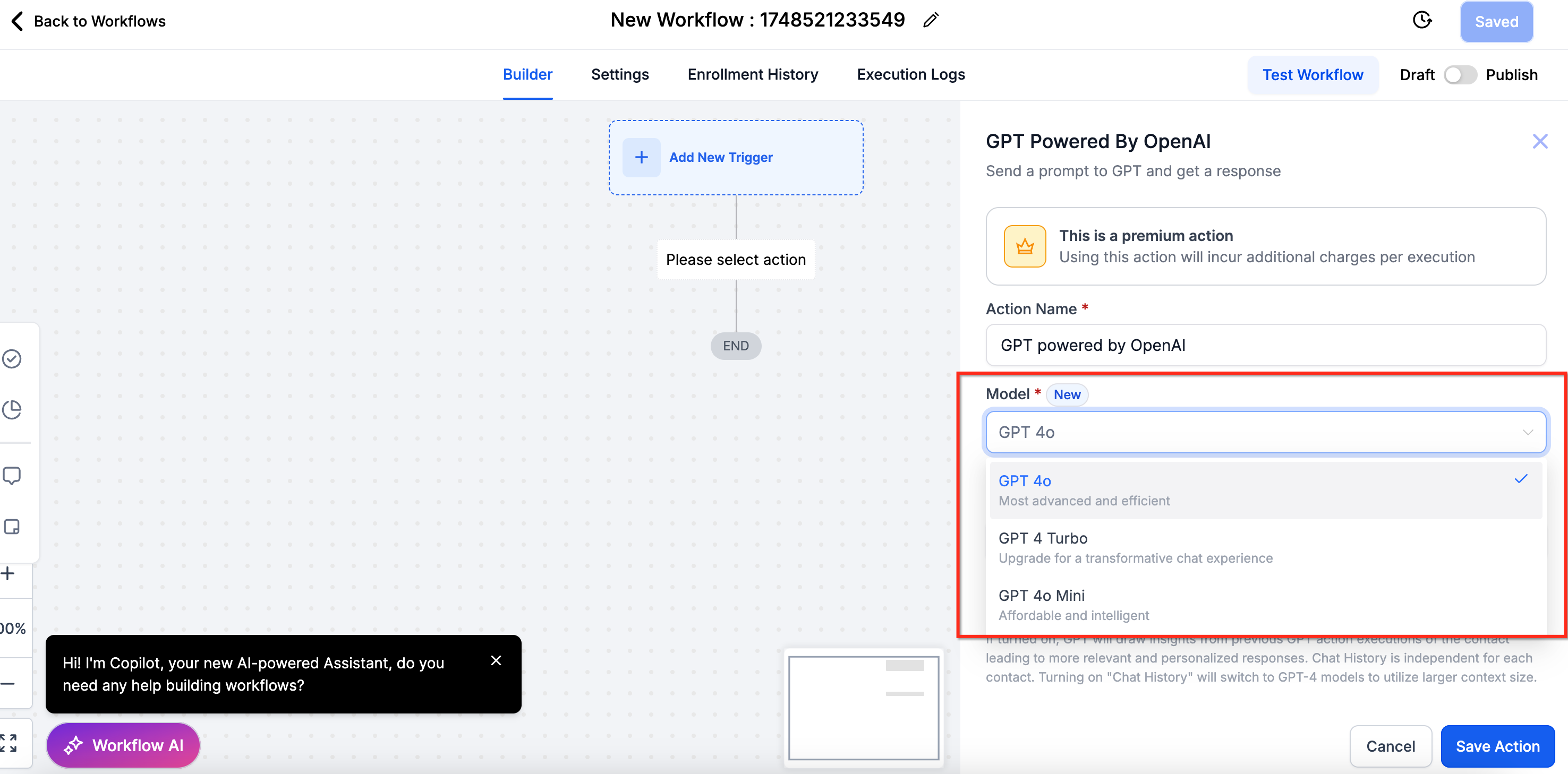
What’s New #
- GPT-4 Turbo: Now available in AI steps with faster response times and lower cost-per-call compared to previous GPT-4 models.
- Model Switcher UI: Select between GPT-3.5, GPT-4, or GPT-4 Turbo directly in your workflow step.
- Improved Prompt Handling: Enhanced merge field support and better handling of complex instructions.
- System Prompt (optional): Add tone or behavior guidance to shape the AI’s personality and output style.
Use Cases and Example Prompts #
| Use Cases | Prompts |
|---|---|
| Lead Follow-Up | “Draft a friendly message to {{contact.name}} thanking them for their interest in {{contact.custom_value.service}}.” |
| Conversation Summary | “Summarize this conversation in 2-3 bullet points.” |
| Email Draft | “Write a persuasive email promoting our {{contact.custom_value.offer}} to a potential client.” |
GPT Models Compared #
| GPT 3.5 Turbo | GPT-4 Turbo | GPT-4o | GPT-4o Mini |
|---|---|---|---|
| Not as good as 4 turbo | More advanced and powerful | Optimized for specific tasks | Lightweight version of GPT-4o |
| Good responses | Consistent and accurate responses | Consistent with slight trade-offs | Efficient but less comprehensive |
| Not that consistent | Can handle highly complex queries | Handles most queries effectively | Best for less complex queries |
| May struggle to connect the dots | A bit slower than GPT-4o Mini | Balanced speed and performance | Fastest in response time |
| Faster responses | Superior contextual understanding | Good contextual understanding | Adequate for basic needs |
| as per tokens utilized | as per tokens utilized | as per tokens utilized | $0.015 per execution |
The GPT-Generated Output #
After selecting and configuring the desired AI model, incorporate a ‘GPT powered by OpenAI’ action into your workflow to generate dynamic output aligned with your configured prompts.”
- Select the Action Type:
- Pick from predefined options:
- Analyze Text Sentiment
- Summarize Text
- Translate
- Custom (for your own prompt)
- Analyze Text Sentiment
- If using Custom, enter your own prompt (e.g., “Write a follow-up email based on this message: {{contact.message}}”).
- Pick from predefined options:
- Use Dynamic Variables (Optional):
- Insert dynamic fields like {{contact.first_name}} or {{event.notes}} into your prompt to personalize the output.
- Insert dynamic fields like {{contact.first_name}} or {{event.notes}} into your prompt to personalize the output.
- Test or Run the Workflow:
- Once the action is added, you can test the workflow using a contact to see the GPT output in action.
- The AI output can be used in subsequent workflow steps (e.g., send as an email or SMS).
- Once the action is added, you can test the workflow using a contact to see the GPT output in action.
IMPORTANT: If you are concerned about where does the output go,

The AI-generated content can be:-

1. Stored in Custom Fields

2. Used directly in Email or SMS steps

3. Logged internally or sent to a team via Slack/Webhook
Frequently Asked Questions #
Q. What is GPT-4 Turbo, and how is it different from GPT-4 or GPT-3.5?
GPT-4 Turbo is a faster, more cost-efficient variant of GPT-4 with improved performance for high-volume use cases. Compared to GPT-3.5, it offers better contextual understanding, more accurate content generation, and supports larger prompts.
Q. Is GPT-4 Turbo available in all aixios plans?
No. GPT-4 Turbo is part of aixios premium Content AI features. Access may vary based on your subscription plan and usage settings. Check your plan or contact support for upgrade options.
Q. Does using GPT-4 Turbo in workflows cost extra?
Yes. GPT-4 Turbo is a premium workflow action, and usage is billed based on the number of tokens processed per execution. You can monitor usage and costs in the AI Billing Settings of your account.
Q. Can I switch between GPT-3.5 and GPT-4 Turbo within the same workflow?
Yes. Each AI step allows you to select the model independently. You can mix and match GPT-3.5, GPT-4, and GPT-4 Turbo within a single workflow based on the complexity or budget of each step.


