TABLE OF CONTENTS
Overview
Action Name
Action Description
Action Details
Example
Custom Objects are only available on the $497 plan #
Overview #
The Create an Associated Record action in Contact-based workflows allows users to create a new custom object record and associate it with a contact. This feature is useful when managing related entities such as properties, contracts, or any other custom object tied to a contact.
Action Name #
Create Associated Record for Contact
Action Description #
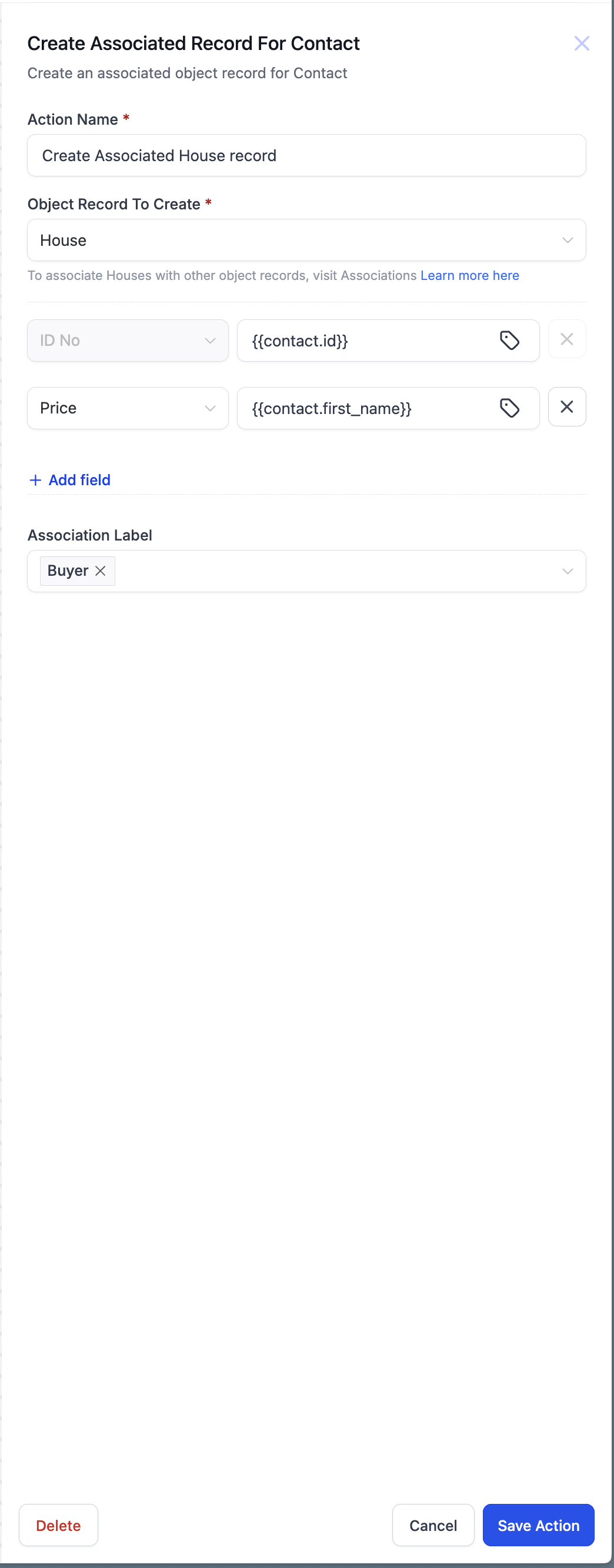 This action enables users to create a new custom object record directly from a workflow and associate it with a contact. The available objects for creation depend on the custom objects configured within the sub-account.
Action Details #
- This action is possible only after creating custom objects in the subaccount and creating an association label between at least one of those objects and contacts.
- It allows defining multiple fields for the new object record.
- Users can specify an association label to categorize the relationship between the contact and the custom object.
- The newly created record is automatically linked to the contact using the selected label.
- Users can also use custom value and custom fields – merge fields to add the information to the object
Example #
A solar company needs to track crucial dates for installations, such as:
- Site Survey Date
- Install Date
When an Opportunity is marked as “Won,” the system should automatically create an “Install” custom object record for tracking these dates.
Example Setup:
- Object Record to Create → Install
- Fields:
- Site Survey Date → Auto-filled with today’s date
- Install Date → Auto-filled based on scheduling
- Association Label → Installation Scheduled
When triggered, the workflow creates an Install record and links it to the contact for seamless tracking.


